In my last 2 blogs, I have written about calling D365 Web APIs from Logic Apps. This blog is the real reason why I was exploring the options of calling D365 Web APIs directly from Logic Apps, instead of using the Dynamics connector provided by Logic Apps.
In real life, the integration is not always about creating individual records. In my experience, a lot of integration scenarios are related to
transaction integrity. This means that a group of related Create, Update and Delete requests are executed as one logical transaction. Transactions are useful in scenarios where you have to commit a group of operations/requests in entirety, and ensure that the system will roll back all changes if any of the requests fail.
In general, most of the synchronous plugins, synchronous workflows and actions support transactions, but it is not recommended (best practices) to use them for integration. D365 also provides the
ExecuteTransactionRequest method to support transactions. It is a part of the
Organization Service (“SOAP Endpoints”). Using this means that you have to add Microsoft.Crm.Sdk.Proxy.dll and Microsoft.Xrm.Sdk.dll assemblies to your projects.
So what would you do if you are using Logic Apps as an integration layer? One solution is to use the Web APIs
Batch operation. Please check the details of this command on
https://msdn.microsoft.com/en-us/library/mt607719.aspx. The primary purpose of the Batch operation is to bundle multiple requests/operations into one HTTP call. The Batch operation provides
changesets to support transactions.
For this blog post, I have used CRM Web API’s Batch operation to support transaction integrity.
Scenario
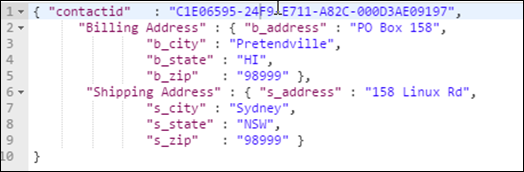
I am keeping the scenario very simple. An external system is calling the Logic Apps with contactid, billing address, and shipping address.
The Logic App should create both the addresses linked to the contact with the contactid. If any of the requests fail, CRM should roll back all the requests. The following screenshot displays the body of the request.
In real life, the
change set can contain requests to create/update/delete different kinds of records.
Solution
We have used CRM Web APIs
Batch operation to achieve transaction integrity for this scenario. For this blog, I have used the Logic App created in my previous
blogs.
The
Logic App receives the request, get the authentication token and make the batch request. If the call is successful, the Logic App terminates with the status of
Succeeded,
otherwise it creates an integration log
record in CRM and terminates with the status
of Failed.
The updated Logic App has the following steps. Steps 4 and 5 are exactly the same as my previous blog.

Step 1
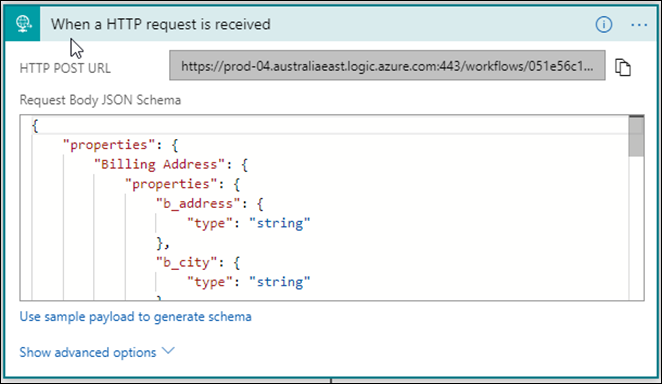
It is an HTTP trigger. It is receiving the request. The payload schema has been updated based on the body of the request.
Step 2
The Web API
Batch operation requires a unique batch number and changeset number. This step initialises the batch number for the request. I have used
Batch_guid as the format of the batch number.

Step 3
This step initialises the changeset number for the request. I have used
changeset_random number (100-999) as the format for the changeset number.

Step 4 and Step 5
These steps are exactly the same as my previous blog
Calling D365 APIs from Logic Apps. These steps get the authentication token and parse the token so it can be used to make the Web API call.
Step 6
This is the most important step. It is using a
HTTP action.

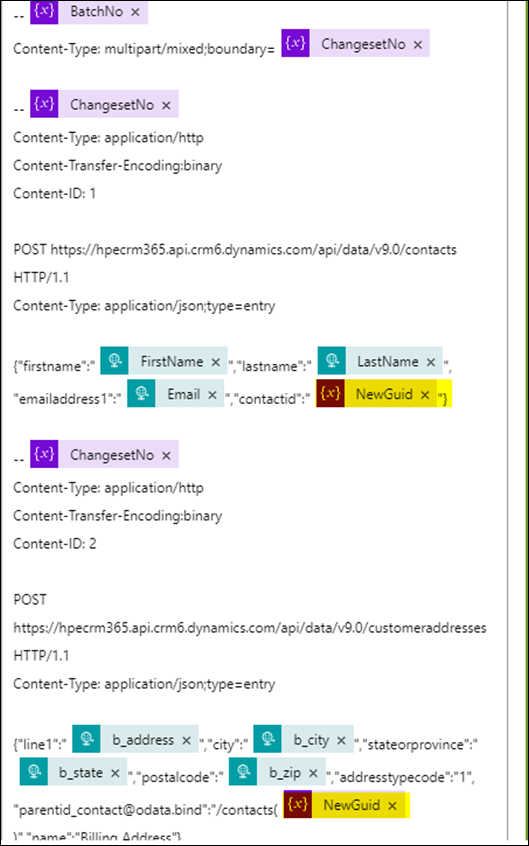
The request body is quite big for a batch request. The screen is just displaying the start of the body and the first request to create the customer address. To make the batch request, the following information is required.
- Use Post as Method.
- Provide the D365 Web API Uri. The last part of the Uri is the name $batch .
- Headers are the same for all the Web API calls except content-type. The content-type for the request is multipart/mixed boundary =BatchNo
- The body of the request contains all the individual calls. There are specifics on how to use batch no. and change set no. in the request. Be mindful of that. I have provided the whole app definition at the end of this blog.
Step 7
This step will create an integration log record in CRM in case of an error in Step 6. I have used the
Dynamics 365- Create a new record action for this step.

One of the reasons to create an error log is that the output of the batch request is the base64 format. The error messages are not in human-readable form. When we log them, the Logic App automatically decodes the base64 strings.
Note: I am logging the whole output body in this step. In real life, you can use the substring function to log just the error description part of it.
Step 8
The purpose of this step is to terminate the Logic App with the status
Failed. Steps 7 and 8 will be executed only if Step 6 fails.

Results
I have used Postman to trigger the Logic App.

Successful Execution
If the call is successful, you will be able to see 2 addresses related to the contactid provided in the request body.

Failed Execution
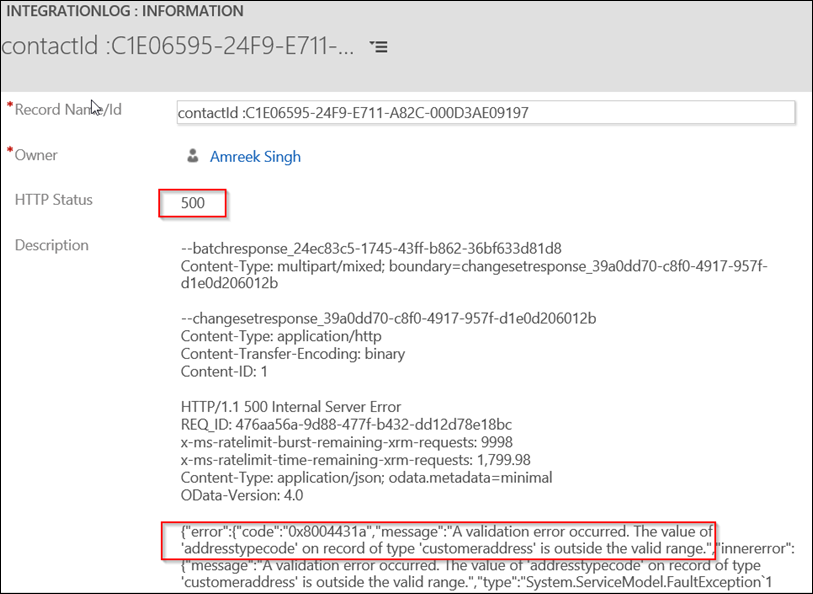
To test the failure scenario and transaction integrity, I manually updated the addresstypecode to 8 for the second request in the changeset. This addresstypecode does not exist in the CRM. The Logic App logged the following error in CRM, and there were no address records in the system. The error was in the second request, but the system has rolled back the creation of the first record too. That is how you implement transaction integrity.
Where From Here
This was a simple example, but what if we had to create a Contact record first and then create Addresses linked to the Contact record created as a part of the transaction?
Please share your solution in the comment section. I have a few things in my head, which we will talk about it in the next post.
Logic App Definition